An AI report card on how you actually trade
Most journals hand you numbers and leave the reading to you. note500's AI does the reading: it goes through your closed trades and writes a data-forward report card — a 0–100 score, then what you do right, what your mistakes are, and how to improve, with the dollars on each. And when you have a question of your own, the AI Mentor answers it straight from your journal's real numbers.
Try note500 free →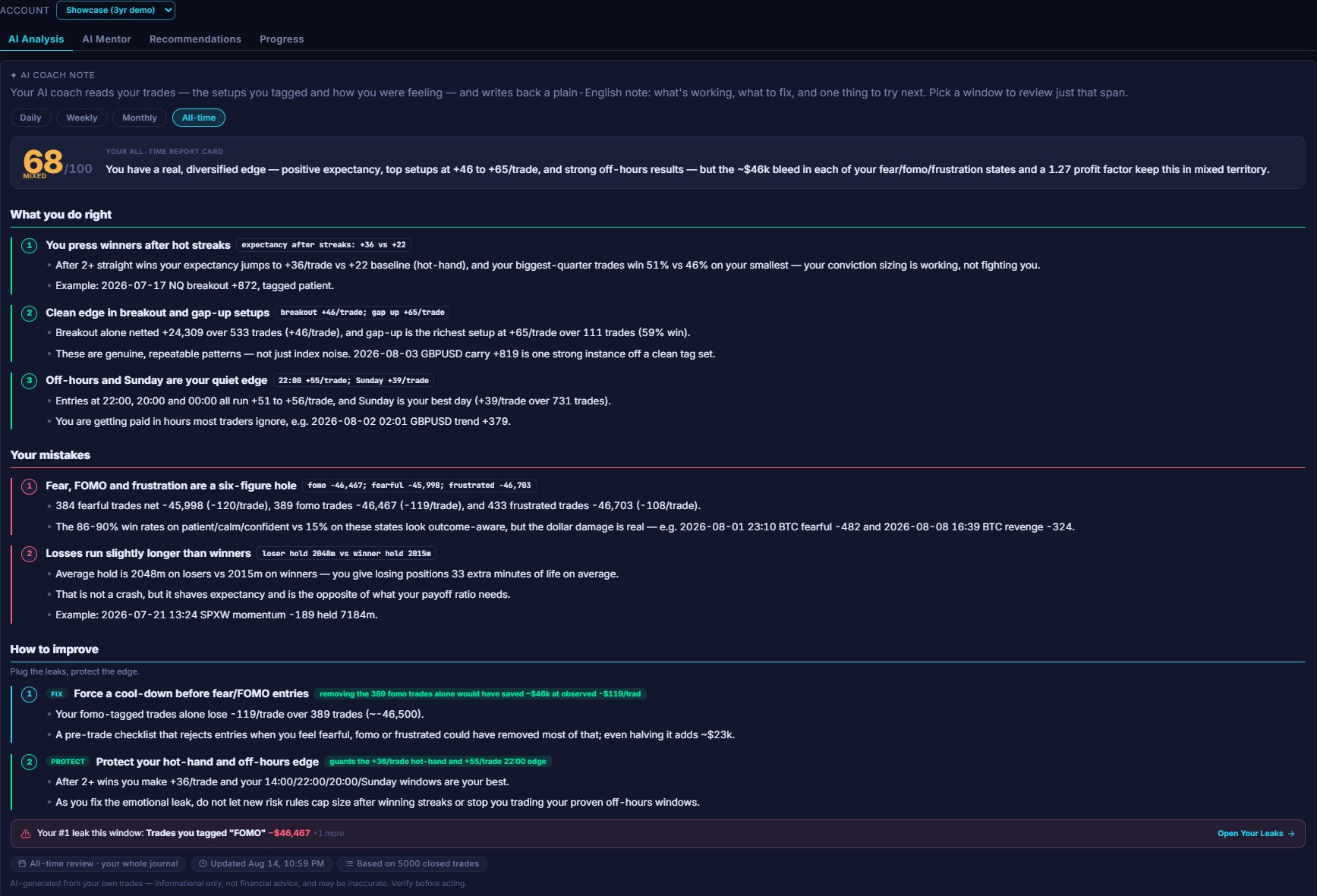
The AI lives on four tabs: AI Analysis writes the report card, AI Mentor answers your own questions from your numbers, Recommendations keeps a running list of every fix it has suggested, and Progress shows whether you're actually getting better. Here's what each one does.
AI Analysis — three questions, every review
What you do right
The setups, times and habits where your numbers are genuinely good — your real edge, so you can lean into it on purpose.
What your mistakes are
The habits costing you money — a bad hour, revenge after losses, cutting winners early — each named plainly, in dollars.
How to improve
Fix the costly mistakes and protect the edge — each with the money it would save or make, so you know what to change first.
Each review opens with a 0–100 score that weighs your process, not just whether you made money, and a one-line read of the window. Then come the three sections above — every finding backed by the numbers, and every fix carrying a dollar impact. Not "you traded emotionally," but "stop after two straight losses → you'd have kept ~$3,800." It even shows whether you're improving vs the window before.
It reads the things you'd never tally by hand
The review looks across your trades for edges and leaks you'd have to be a spreadsheet to spot on your own:
- Time-of-day and day-of-week performance
- Per-ticker and per-setup results
- How you trade after a run of losses — tilt and revenge
- Hold time, position sizing, and how much fees are eating
- Your own psychology tags, correlated with what actually happened
It pairs with a Tilt Detector that buckets your trades by the losing streak behind them — so you can see, in your own numbers, whether losing makes you trade worse after 1, 2 or 3+ straight losses.
AI Mentor — ask your own journal anything
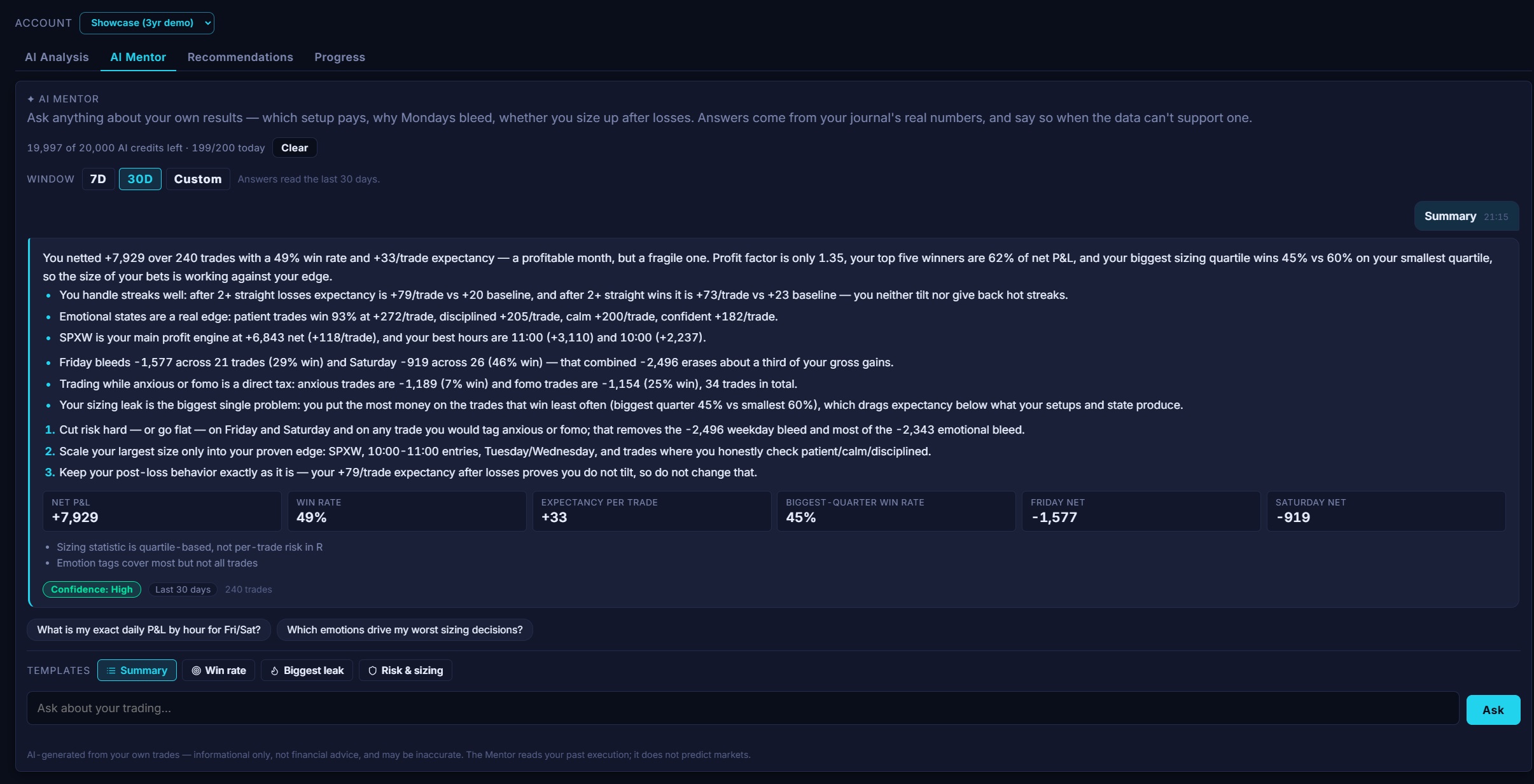
Sometimes you don't want a report card — you have a specific question. The AI Mentor is a chat that answers from your real numbers: which setup pays, why do Fridays bleed, should I size up after losses? Ask in plain English and it replies with the figures behind the answer — net P&L, win rate, expectancy, per-hour and per-day breakdowns — a confidence level, and the honesty to say when your data can't support a claim rather than making one up.
One-tap templates — Summary, Win rate, Biggest leak, Risk & sizing — get you a full read in a click, and a window selector (7 or 30 days, or a custom range) scopes every answer to the span you care about. It reads your past execution; it doesn't predict the market.
Recommendations — every fix, in one place
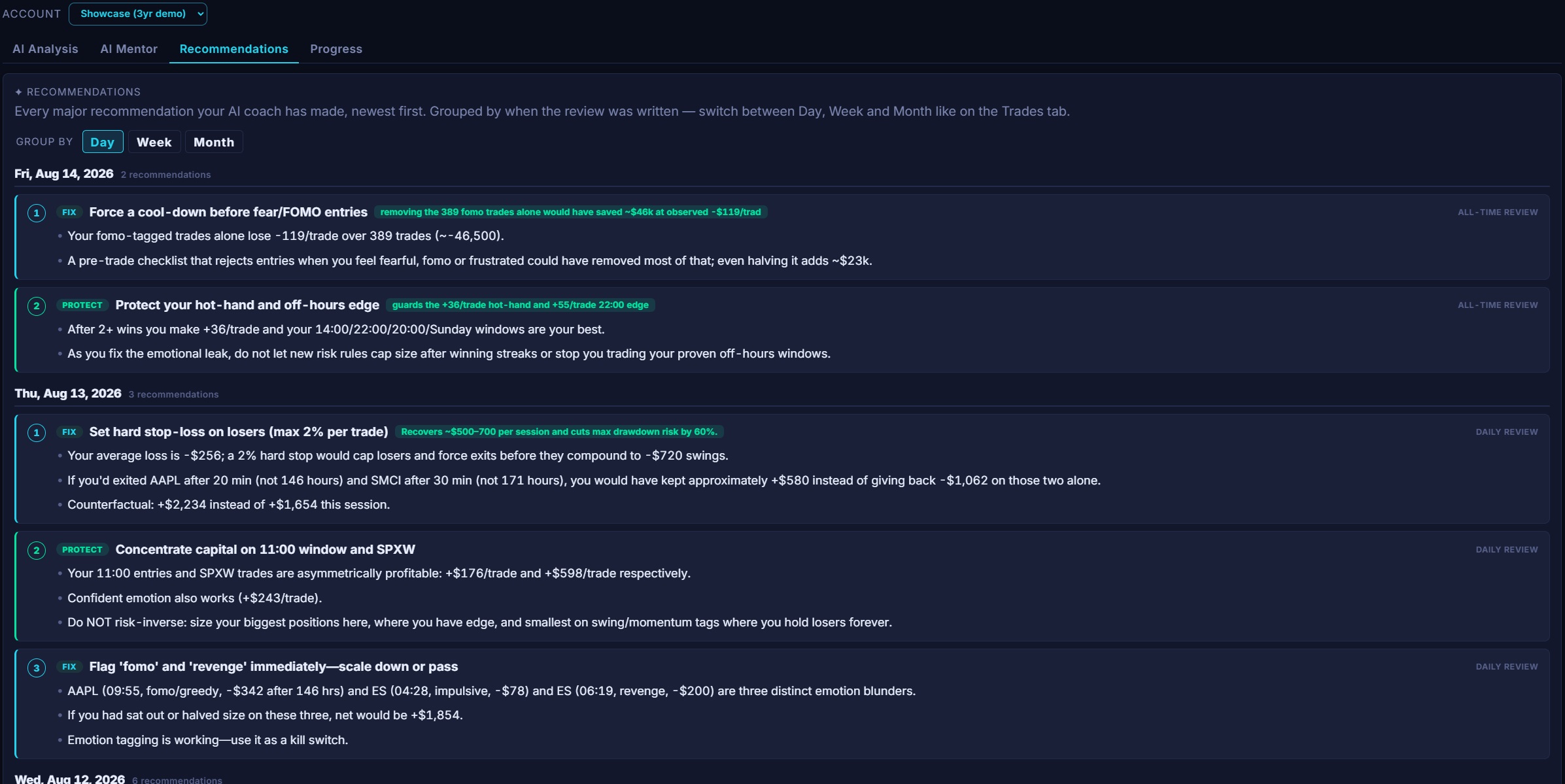
Each review ends with fixes; the Recommendations tab collects them all in one running list, newest first, grouped by day, week or month like your Trades tab. Every card carries its dollar impact and whether it's a Fix (a leak to plug) or a Protect (an edge to guard) — so the highest-value change is always one glance away.
A score, a trend, and the money on the line
Every review opens with a 0–100 score that weighs your process, not just whether you were green — a clean, disciplined window scores high; a lucky, sloppy one doesn't. Under it, the three sections answer the questions that actually change how you trade, and each fix carries a dollar figure: not "trade less emotionally," but "ban revenge trades → you'd have kept ~$3,800." A trend line tells you whether you're improving versus the window before.
Every window, its own report card
On Plus you get weekly, monthly and all-time reviews, written automatically in the background — there's nothing to run, they're just there when you look. Ultimate adds a same-day daily review, so you can close the laptop with a read on the day you just had. Each window is scored and analysed on its own, so a rough week shows up even inside a strong month.
Today, before you forget
A same-day read on the session you just traded — what worked, what slipped, one thing for tomorrow (Ultimate).
The patterns emerging
Enough trades to see real habits — your best setups and hours, your costliest leaks, and whether you're improving.
Who you are as a trader
Your whole journal in one score — the edge you can lean on and the leak that's quietly capped your account.
Reviews are generated with Anthropic's Claude models from a structured digest of your own trade statistics — the same numbers you see on your Reports and Trades tabs, so the review never contradicts what's on your screen.
Progress — are you actually improving?
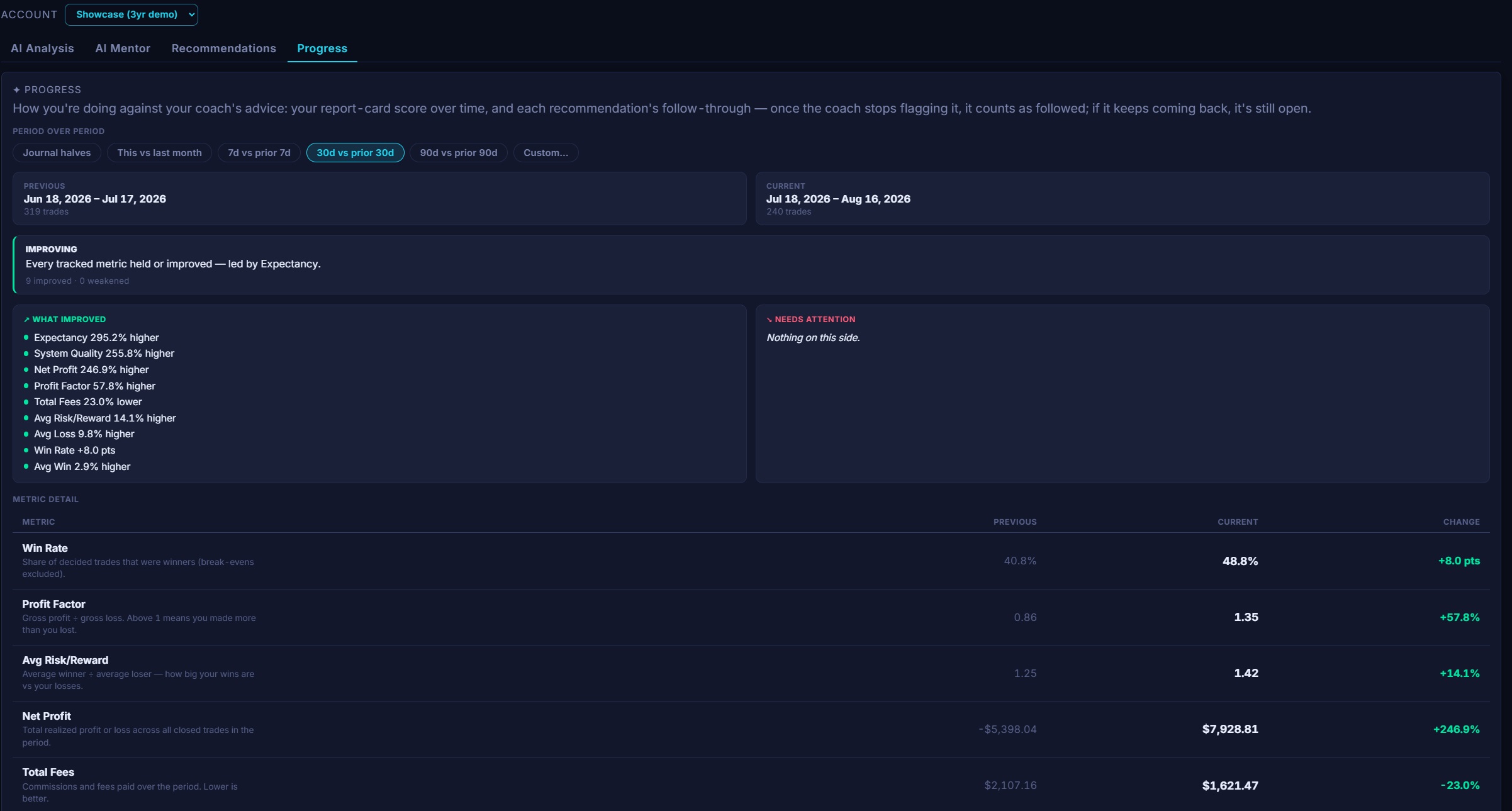
A report card on one stretch is useful; the real question is whether you're getting better. The Progress tab answers it by putting two periods side by side and showing how every headline metric moved — win rate, profit factor, risk/reward, net profit, fees, expectancy, average win and loss, and system quality — each laid out Previous → Current with the change on it, plus a verdict that names what improved and what needs attention.
You choose the two periods. One tap for a preset — this month vs last, trailing 7, 30 or 90 days, or your journal's two halves — or switch to Custom and set two independent date ranges to compare any stretch against any other. Every metric carries a plain-language explanation, so you're never guessing what a number means.
Progress also tracks your recommendation follow-through: the coach's report-card score over time, and each fix it has flagged marked followed once it stops recurring — or still open if it keeps coming back. It's the difference between reading advice and acting on it.
Turn it off, or keep it on — your call
Automatic reviews are on by default for live paid accounts, but the toggle is always yours: switch them off entirely, or leave them running. Whatever you choose is respected. Reviews are generated for your account and shown only to you, right next to the trades they're based on.
Get your trades reviewed →The AI suite — Analysis, Mentor, Recommendations and Progress — is a paid feature: weekly, monthly and all-time on Plus, plus a daily review on Ultimate. The free plan doesn't include the AI reviews. See pricing. AI-generated reviews and answers are for reflection and education, not financial advice.